Trade Cockpit Pilot
Three tabs. One panel. Signal scanning, position sizing, trade execution, and post-trade management — all organized in a clean tabbed interface.
$79 Unlimited license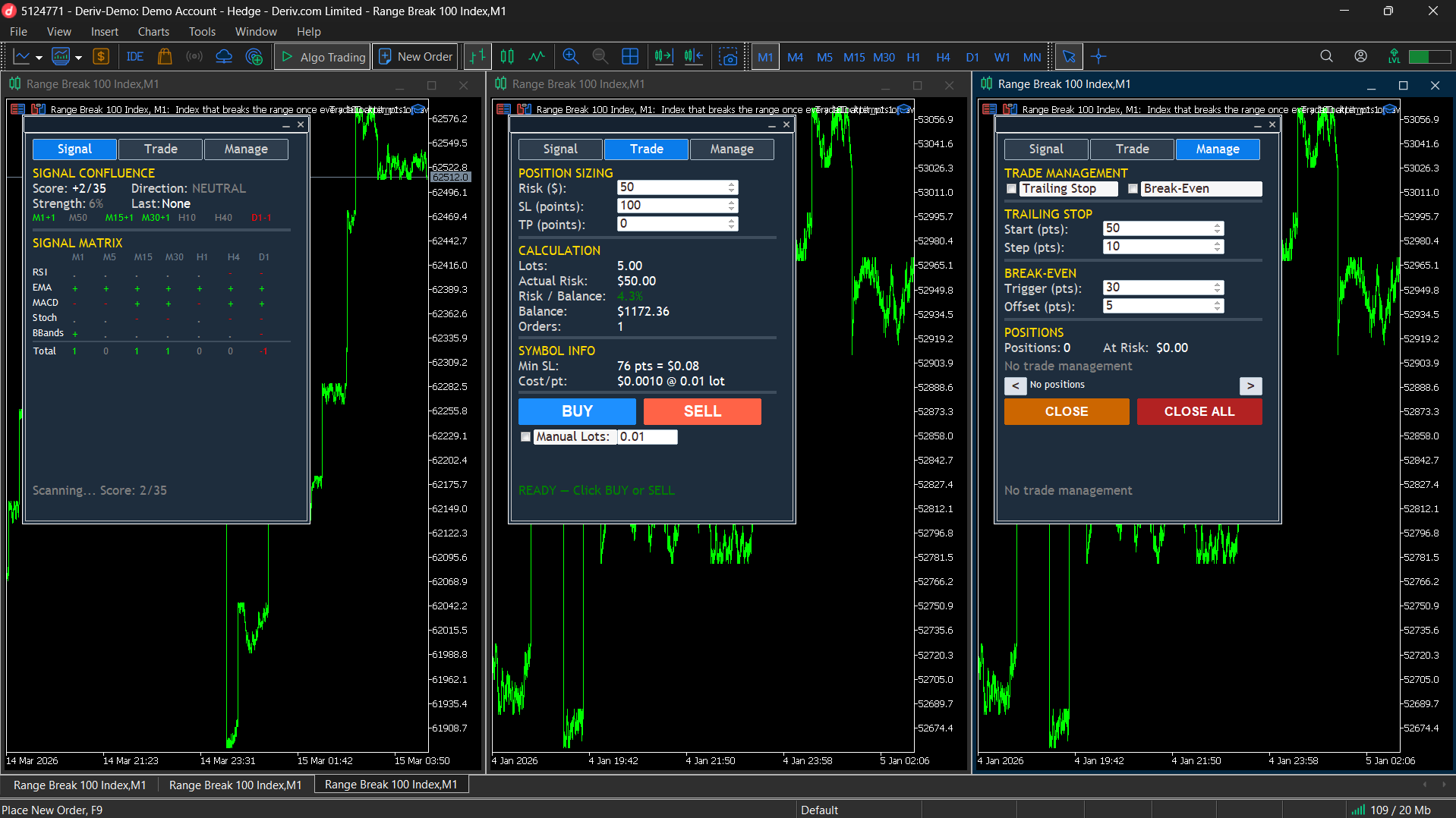
What It Does
Trade Cockpit Pilot brings together a multi-timeframe signal confluence scanner, precise position sizing, one-click execution, and post-trade management in a tabbed panel. No clutter. Only what matters.
- 01 Signal Confluence Scanner — 5 indicators across 7 timeframes. Full 5x7 matrix with each cell individually color-coded: green for bullish, red for bearish, grey for neutral.
- 02 Position Size Calculator — Risk in USD or percentage of balance. Exact lot size via OrderCalcProfit engine. Works on any instrument.
- 03 One-Click Execution — BUY or SELL instantly. Handles SL, TP, min stop distance, fill mode detection, and auto order splitting.
- 04 Trailing Stop — Once profit reaches your target, the stop-loss follows price automatically, locking in gains.
- 05 Break-Even — When profit hits your trigger, the stop-loss moves to entry plus offset — removing risk from the trade.
- 06 Position Navigator — Browse all open positions with arrows. See direction, lots, and profit. Close individual positions or all at once.
Three Tabs
Signal Tab
The full signal confluence view. Composite score, direction (BULLISH / BEARISH / NEUTRAL), signal strength percentage, and the complete 5x7 indicator matrix. Each indicator on each timeframe is color-coded individually so you can see exactly where agreement and disagreement lies.
Trade Tab
Position sizing and execution. Three adjustable fields (Risk, Stop-Loss, Take-Profit) with spin controls. Below them: calculated lot size, actual dollar risk, risk percentage, balance, order count, and symbol info. BUY and SELL buttons with a status bar showing trade results.
Manage Tab
Post-trade management. Enable/disable trailing stop and break-even with checkboxes. Configure trailing start, step size, break-even trigger, and offset. Position navigator shows your open positions with CLOSE and CLOSE ALL buttons. Live status line shows management state.
Theme System
Choose between three visual themes: System (automatically matches your MetaTrader chart background), Light, or Dark.
The entire panel — title bar, borders, backgrounds, text, buttons, and all controls — updates to a coordinated color palette. Every element remains readable regardless of which theme you choose.
Safety Features
- BLOCKED status — Invalid stop-loss distance blocks execution. Red status bar. You cannot place an invalid trade.
- BLOCKED — Risk > Balance — Execution blocked if risk exceeds account balance.
- Over-risk warning — Orange warning when minimum lot size exceeds your target risk.
- Auto order splitting — Large lot sizes automatically split to stay within broker limits.
- Manual lot override — Enable manual lot checkbox to type your own lot size, bypassing the calculator when you want full control.
Signal Engine
5 indicators, 7 timeframes, 35 individual scores. Each cell: +1 (bullish), -1 (bearish), or 0 (neutral).
- RSI — Below oversold = bullish, above overbought = bearish
- EMA Crossover — Fast above slow = bullish, below = bearish
- MACD — MACD above signal = bullish, below = bearish
- Stochastic — Below oversold = bullish, above overbought = bearish
- Bollinger Bands — Price below lower band = bullish, above upper band = bearish
All signals generated on the confirmed (closed) M1 bar to avoid repainting.
Trade Management
- Trailing Stop — When profit (in points) reaches the trailing start distance, the stop-loss follows price at the configured step interval. The stop only moves in your favor. Both start distance and step are adjustable from the panel.
- Break-Even — When profit reaches the trigger distance, the stop-loss moves to entry price plus an optional offset (to cover spread/commission). Each position moves to break-even only once. Break-even runs before trailing, so trailing takes over after.
- Position Navigator — Shows position details: "1/3 BUY 0.50 +$12.50". Arrow buttons browse all open positions. CLOSE removes selected, CLOSE ALL removes every position on the current symbol.
How To Use
- Attach to any chart — the panel appears in the top-left corner. Drag it anywhere.
- Choose your theme — System, Light, or Dark.
- Read the signals (SIGNAL tab) — the 5x7 matrix shows market state across all timeframes.
- Size your position (TRADE tab) — set Risk, SL, and optional TP. The panel calculates everything.
- Execute — click BUY or SELL. Status bar confirms your fill.
- Manage (MANAGE tab) — enable trailing stop or break-even. Browse and close positions.
This is a manual trading utility, not an automated trading robot. The interactive panel works on live charts. In Strategy Tester Visual Mode, the panel displays but buttons are not interactive — this is a MetaTrader 5 platform limitation. Works on any instrument: Forex, Metals, Stocks, Indices, Crypto, Futures.
Get Trade Cockpit Pilot
$79 — Unlimited license. Available now on MQL5 Market.